• (022) 6902 1117

bobbyprima (bobbyprima)


I am UI/UX Designer who have passion in design.

I take the user research, process the information

until create prototyping in mobile apps and website.

I am beginner but it motivate me to be an expert in

UI/UX Designer. Never stop to learn to solve the user's

problem while give the best alternative to achieve

business goals.

CorelDRAW Adobe PhotoShop UI Design UX Design

  Hire Me
Make a Private Project


  Invite to Bid
Existing Projects


User Name: bobbyprima
Account Type: Personal Account
Date Registered: 18/08/2021 11:55:51 WIB
Last Seen: 24/05/2022 01:11:46 WIB
Provinsi: DKI Jakarta
Kabupaten: Kota Jakarta Selatan
Website: https://bit.ly/3jIc8om
Online Hours: 4.71
Projects Won: 0
Projects Completed: 0
Completion Rate-
Projects Arbitrated: 0
Arbitration Rate-
Current Projects: 0

Ratings & Rankings

As Worker
    
0.00/10.00
0 Point
No Ranking
0 Projects
As Owner
    
0.00/10.00
0 Point
No Ranking
0 Projects
As Seller
    
0.00/10.00
0 Point
No Ranking
0 Sales
As Affiliate
    
0.00/10.00
0 Point
No Ranking
0 Users


Services


No record found.


Products


No record found.


2021: At this time a client wants to create a learning application platform with one of the topics being UX Designer that can be accessed anywhere by all users.
The goals of the client are increase the users of platform with initial features offered to the users. They want the first step goals from initial application was engaging more people to use their product.

2021: The client want to create a tourism mobile application. He found the main characteristic of users with several main points.
The case was users want to choose the update travel abroad with his family. He was busy and had no time to organize or plan the traveling, but he wanted to visit the main object, efficient in time, happy with kids without aside the adult tour moment.
The Golas of the Client are doing observation via User Journey Map and create intitial design via wireframing (low fidelity prototype).

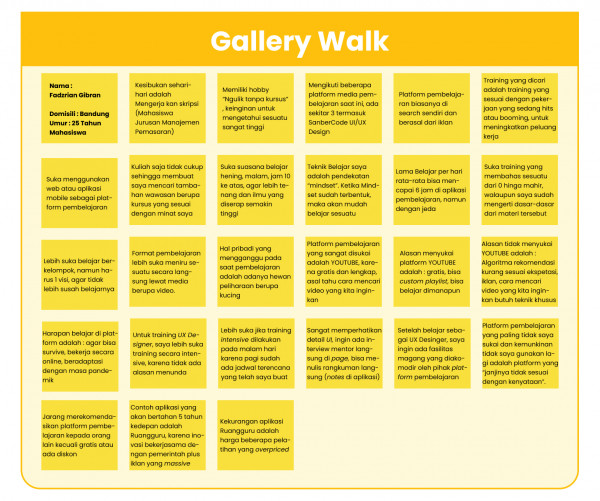
2021: I created a Gallery Walk to accommodate the results of user interviews. This Gallery Walk contains important points or statements from users which are presented through short writings on sticky notes.
I use a gallery walk board to collect all statements and insights from users. This gallery walk makes it easy for me to observe the points that describe the user's view. There are so many insights I found that can help us to get the main points from the users. One surprising statement came from a male student who was very frustrated when there was no "next" button on a learning platform. It became a separate insight for me because as a designer, small things that are forgotten can actually reduce the value of the design significantly. I will try to observe the points in this gallery walk as a basis for moving on to the next stage.

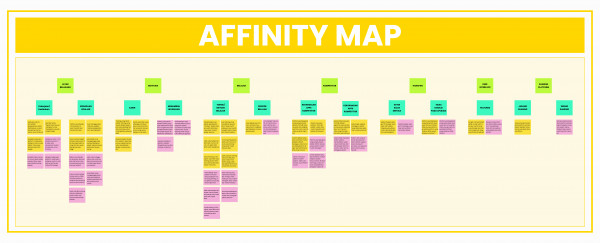
2021: To make it easier for me to process data from user statements, I have to group these points into a larger theme. The main points of the Gallery Walk will be classified into more general themes. At this stage I found some differences between male and female users I interviewed, for example, male student users prefer free and quality learning platforms, while female users are willing to pay as long as the learning is quality and according to their needs. I'm using Affinity Map. This method I use to narrow down the main points of the user. I found some general topics to describe certain main topics in the hierarchy. For example, the general theme of motivation is divided into 2, namely career and adding insight. The classified data will make it easier for me to generate user needs points.

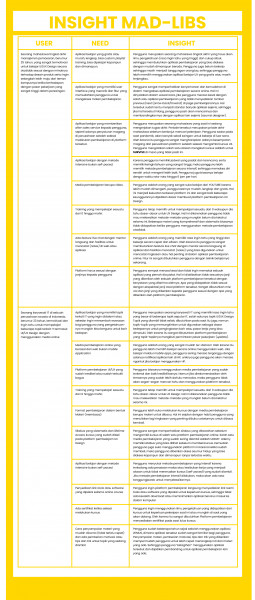
2021: After classified the information into general theme, I went to next step. I organize user information, needs and insights in Mad-Libs Insight tables to simplify problems and insights from users into sentences containing user types, needs, insights and surprising findings. The Mad-Libs Insight results tell us about surprising findings that I had never thought of before. For example, a course application only provides courses, but there are users who hope that the course platform provider also provides facilities to find work according to the courses they take on the learning platform. One of the results of the declarative sentence from Insight Mad-Libs is “Final year students need facilities such as open the opportunity of internships or working as freelancers, even full time from learning applications platform, because it is very difficult to get the right job during a pandemic, and users also use the course to can survive in difficult times like this by working according to the skills he has learned.” I decided to increase the mission of the design work based on the needs and insights of the users.

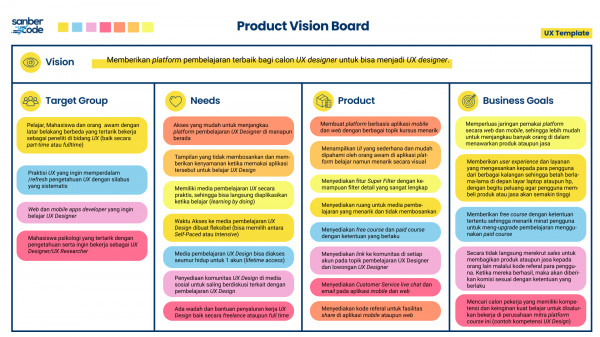
2021: At that time, I made an assumption that was poured into a table. The table contains the target user, user needs, how the product will be made and what is the purpose of the client in making the application.
I use Product Vision Board to bring the big picture of application we want to build. The Product Vision Board showed us the assumption of preliminary points to be developed. It would help us to prepare the next stage of research.

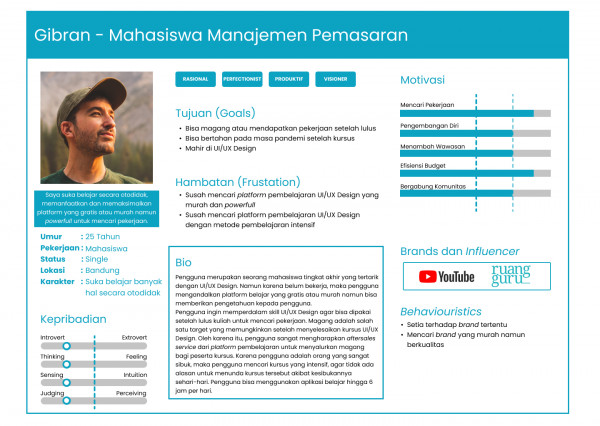
2021: To summarize the information that has been obtained previously, I created a User Persona containing needs, concerns, goals, demographic descriptions to represent several users with the same characteristics. I divide into two user personas with different characteristics, namely users who aim to find Job and users who aim to add insight into working environment. This user persona tells me a major user problem using online platforms to learn. This will be used to serve as the basis for defining the problem statement from the user.

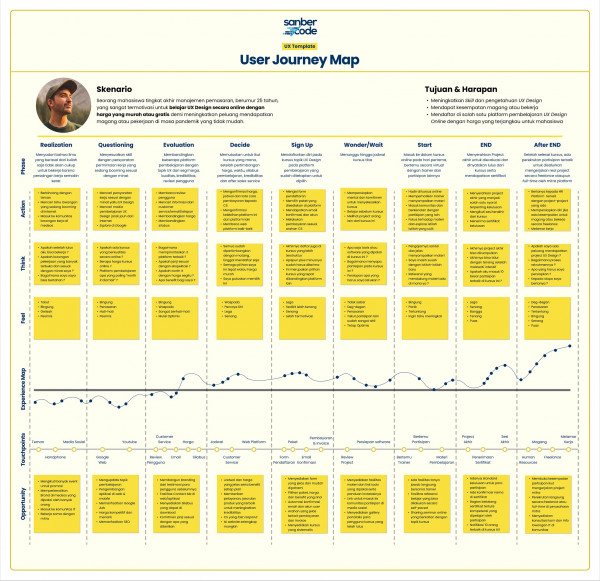
2021: I use a roadmap to visualize a user process outline into an easy-to-view summary. The result is a concise summary of the user's journey from start to goals. In this map I divide it into 9 phases, namely realization, questioning, evaluation, decide, sign-up, wonder/wait, start, end, after end. Each phase is filled with what to do, what to think, and what the user feels. At the bottom line, there are business opportunities that can be maximized from the user needs described above.
The user initially realizes that he needs skills that can be used for work, then he asks how I will improve my skills during the pandemic, one of which is taking online courses, then the user looks for which courses are cheap and have good quality, once convinced, then he will sign up, try the course for free and then buy it, then the user joins the course, finishes and there is an opportunity to join an internship or work part-time. I decided to use this to summarize the complex user experience journey become simpler and easier to understand.

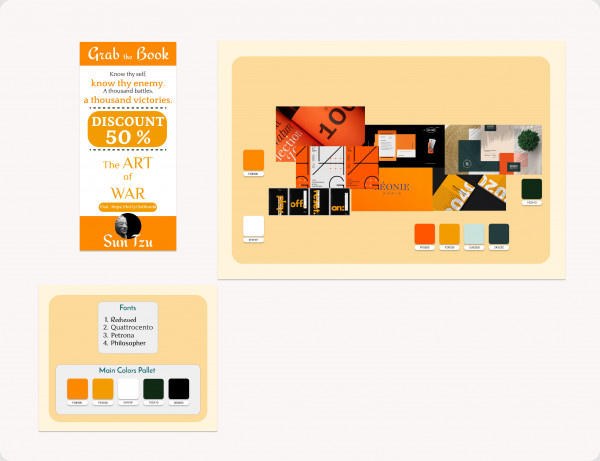
2021: I took some color and typography related images from the web to inspire me to create a basic UI for the app. After I collected the images, I found some image properties that can be applied to the Visual Design of the User Interface. At this time I took the blue color theme because in psychology, the blue color represents trusworth, self-expression and is used to inspire trust, draw attention, communicate awareness, and stimulate productivity. The colors and typography of the images gave me a constant theme in design preparation.

2021: I created a User Interface style guide to achieve consistency in my designs. The User Interface style guide will help me make my designs easier and faster in prototyping.

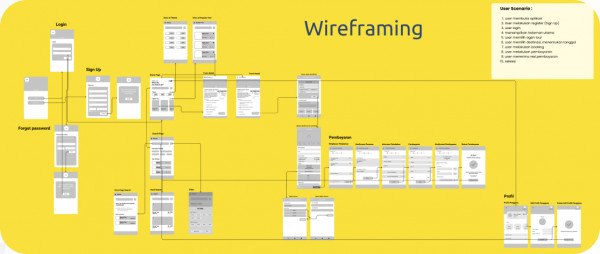
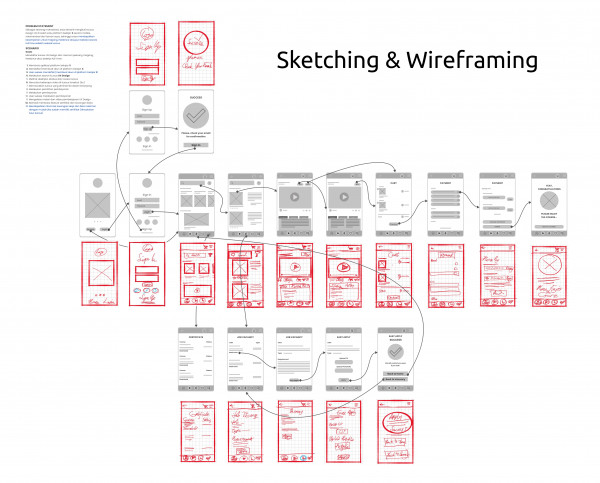
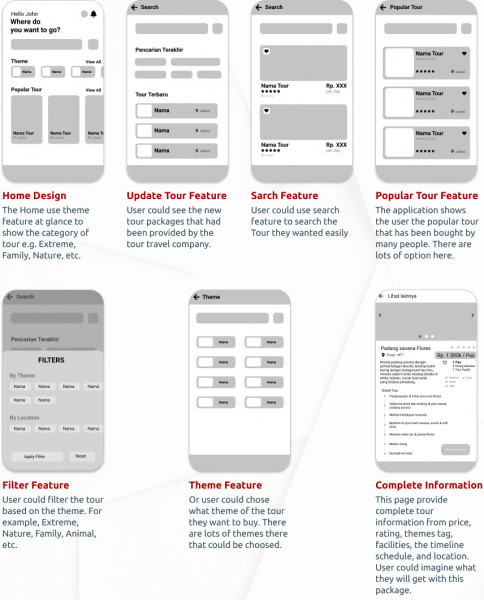
2021: Using sketching with crazy 8 to collect the idea and choosing the best one. Wireframe was created after all the sketch ready to duplicate with low fidelity prototyping using design software, Figma. Wireframing tell us the frame of content that would be present in our application soon. This wireframe would be the basic frame before applying mockup to the design.
I Sketched based on the need of user and business goals. So I prepared for trial feature and Job Portal menu consist of Easy Apply feature. In this Easy apply, the user could apply the job fast and easy. They only need upload the resume and klick the submit button.

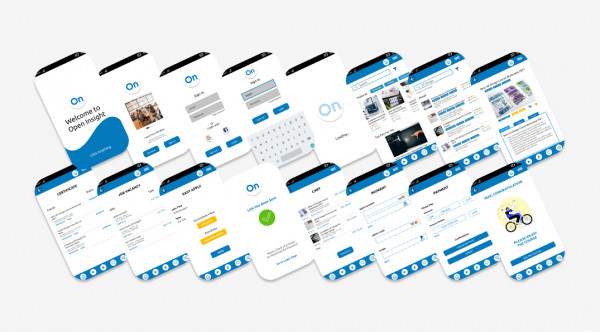
2021: I use the color and typography from User Interface Style Guide that has been created before. The mockup and prototyping process would give me high-fidelity of the prototype, so that the design would be closer to the real design of application. Applying mockup and prototype must solve the problem that exist from the beginning. When the prototype finish, it would be tested to users to see the usability of the design/application. After tested, it usually observed by the designer related to major problem that could be solved. Once it solved, the iteration process start. The design would be tested again to users until all problem under the treshold lineand can be tolerated. In this phase, stakeholder or client could get the major view of UI Design in color, posisiton of the elements, flow etc.

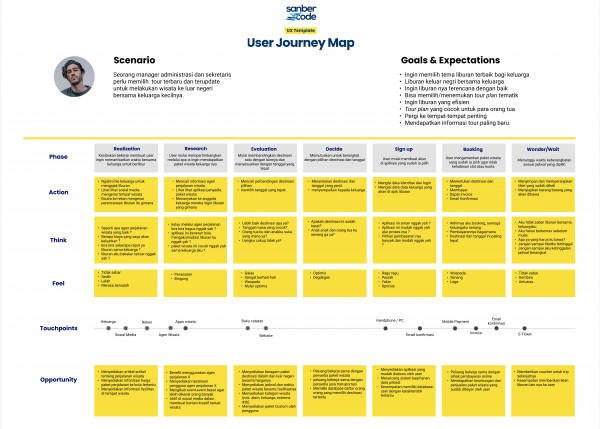
2021: We have gotten the prolem and solution for the user. It’s the time to construct the User Journey Map to understand the user’s process. I and my team devided the phase into 9 steps from realization, research, evaluation, decide, sign up, booking, and wait/wonder. Each step will contain what user do, what user think, and what the user feels. At the bottom line, there are business opportunities that can be maximized from the user needs described above. For example, client coud provide update information about the tour package including the price, provide the schedule and facilities, provide tour category (e.g. extreme, family, nature tour and travel etc.), provide the custom travel from users, and so on.
That’s all what we got from our discussion related to solve the problem of users. When users are interested in certain platform, the usually loyal and try another product again when they want to travel again.

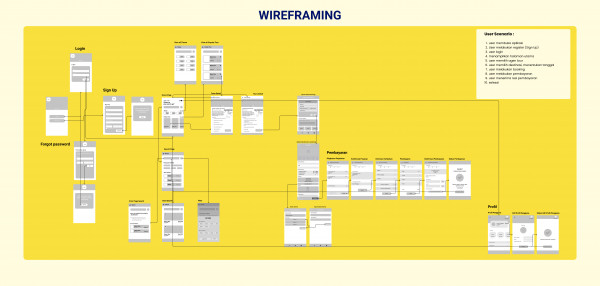
2021: Wireframing usually start with sketching phase, but in this stage, we miss the sketching part because the time is too tight and it was late at night. We devided into several part and start creating wireframe, each person did 2 part of theme page. I got payment and profile pages. We finish each part of the wireframe and then, we join the part one by one until we got the complete wireframe of application.

2021: Wireframing usually start with sketching phase, but in this stage, we miss the sketching part because the time is too tight and it was late at night. We devided into several part and start creating wireframe, each person did 2 part of theme page. I got payment and profile pages. We finish each part of the wireframe and then, we join the part one by one until we got the complete wireframe of application.


No record found.


No record found.


Anda harus login terlebih dahulu untuk melihat data ini.

You must login first to see this data.


Live Chat